
Personal
For individual users
$14.99$149/ month/ year
1 Windows desktop
- Complete PERCARIS software
- 1 Windows desktop
- AI-agent visibility
- Activity history
- User-controlled Stop
- Software updates
Launching soon

PERCARIS gives you visibility into active AI agents on your Windows computer—when they are running, what activity is visible, and the control to stop agents you did not authorize.
PERCARIS does not automatically decide what software should be terminated. You remain in control.
See when an AI agent becomes active on your computer.
Understand what PERCARIS detects about the agent and its activity.
If you did not authorize the agent, use Stop to terminate it.
Know when AI agents are running on your Windows computer.
Review the activity and context PERCARIS surfaces.
Authorize what belongs. Use Stop when it does not.
See how PERCARIS detects AI agents on Windows 11: it alerts you the moment one becomes active on your PC, shows you what it is doing, and lets you stop it with one click or let it keep working.
AI agents are the next big thing in software. They don’t just chat, they act. They can click, type, open your files, and browse the web, right on your PC.
An AI agent is software that can take actions on your computer, for you. They’re showing up in apps, browser extensions, and assistants you may already use.
That’s powerful. But agents often work quietly, in the background. And it isn’t always obvious when one is active, or what it’s doing. So, would you notice?
That’s why we built Percaris. Percaris is Windows software that tells you when an AI agent is active on your PC, and lets you decide what happens next.
Here’s how it works. One: the moment an agent starts, Percaris alerts you. Two: see which agent is active and the activity Percaris observes, live. Three: you decide. Stop it with one click, or let it keep working.
To be clear, Percaris isn’t antivirus, and it doesn’t block AI on its own. It gives you visibility and control, so you stay in charge. That means more peace of mind, for your personal files, your work, and your whole team.
Every plan includes the complete Percaris software, just pick your coverage. Personal for one PC. Power for up to five. Small Business for up to 25. And Enterprise for 26 and beyond.
Know when AI is acting on your computer. Get Percaris today at percaris.com.
Every plan includes the complete PERCARIS software. Choose based on the number of Windows desktops you need.
For individual users
For power users
For teams
For larger organizations
Checkout is connected in Test Mode for demo purchases. Live sales are not open yet.
PERCARIS is preparing for launch. Leave your name and email so we can notify you before purchase opens. Prices above stay published so you can plan coverage.
Launch-list members hear first when checkout goes live — one availability email, not a campaign.
See which AI agents are active, what they are doing, and take action when needed.
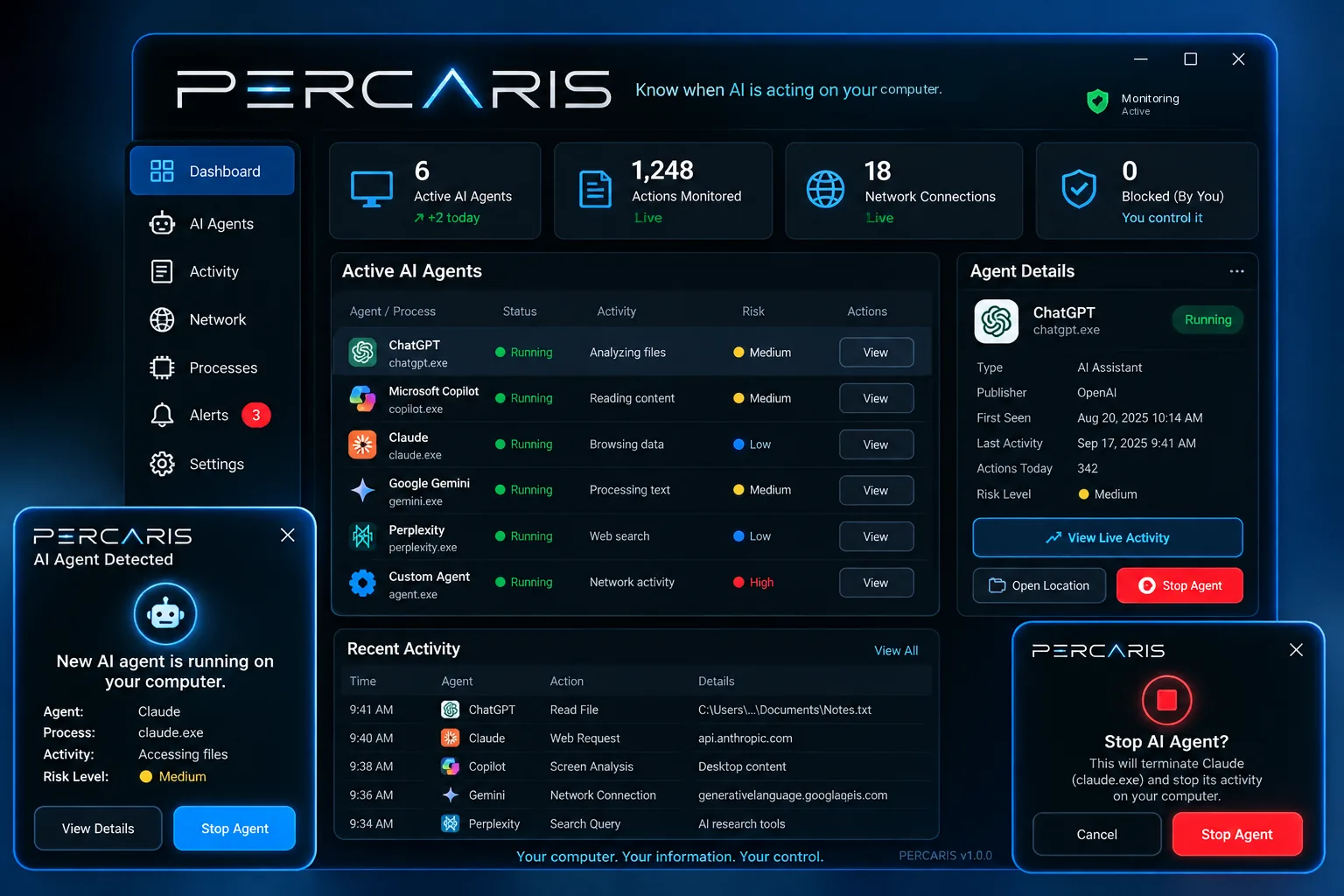
Traditional endpoint security focuses on malware, viruses, ransomware, and endpoint threats. PERCARIS focuses on visibility and oversight of active AI agents operating on your Windows computer.
PERCARIS currently supports Windows desktop computers. macOS support is planned for a future release. Phones and tablets are not currently supported.
Clear answers while PERCARIS prepares for launch.
Pick a plan to try Test Mode checkout, or join the launch list below for availability updates.